
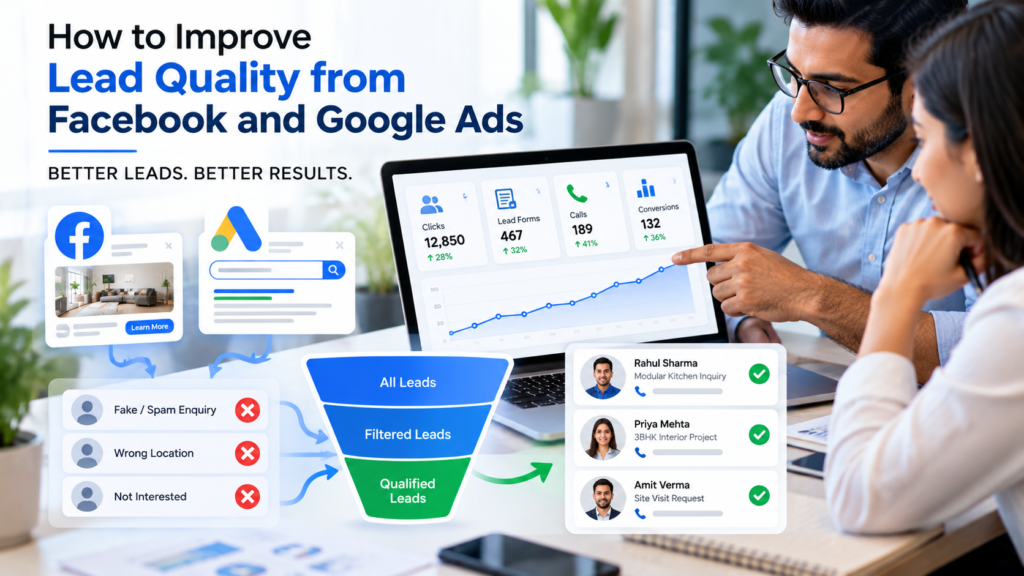
Are your Facebook and Google Ads generating leads, but very few of them turn into actual customers?
You are not alone. Many businesses receive enquiry forms, WhatsApp messages, and phone calls through paid advertising, yet struggle to convert those leads into sales. Some people are just exploring prices, some have a very limited budget, and others never respond after submitting an enquiry.
The problem is not always the number of leads. Often, it is the quality of the leads your campaigns are attracting.
Whether you run an interior design business, sell modular kitchens, provide solar installations, or offer professional services, improving lead quality can help you use your advertising budget more effectively.
In this guide, we will explain how to improve lead quality from Facebook and Google Ads using better targeting, stronger ad copy, smarter landing pages, and effective follow-up strategies.
1. Understand the Difference Between Lead Quantity and Lead Quality
Getting 200 leads in a month may sound impressive, but what if only five people are genuinely interested in buying?
Compare these two scenarios:
- Campaign A: Generates 100 leads at ₹150 per lead, but only 5 are qualified.
- Campaign B: Generates 40 leads at ₹300 per lead, with 15 qualified prospects.
Campaign A has a lower cost per lead, but Campaign B delivers three times as many qualified prospects. Depending on sales and revenue, Campaign B may be the more profitable campaign.
This is why businesses should track more than just cost per lead (CPL). Monitor qualified leads, appointments, sales opportunities, and actual conversions.
2. Define Your Ideal Customer Before Running Ads
One of the most common advertising mistakes is targeting too broad an audience without a clear idea of who is most likely to buy.
Before launching a campaign, identify:
- Your ideal customer’s location.
- Their budget or spending capacity.
- Their needs and problems.
- Whether they are ready to purchase or only researching.
- The services or products that suit them best.
Example: If you provide premium modular kitchen services in Chandigarh, Mohali, and Zirakpur, your ads should clearly communicate the type of projects you handle and the approximate investment required, where appropriate.
This helps attract people whose requirements are closer to what your business offers.
3. Improve Facebook and Instagram Ads Targeting
Facebook and Instagram Ads are useful for reaching people based on their interests, behaviour, location, and engagement with your business. However, broad reach does not automatically mean better leads.
To improve lead quality:
- Target locations where you can realistically deliver your service.
- Use relevant creative images and videos that reflect your actual offering.
- Test different audience segments and campaign objectives.
- Exclude irrelevant locations or audiences where appropriate.
- Use qualifying questions in lead forms.
- Review which audiences generate qualified leads, not just cheap enquiries.
For example, an interior design advertisement can ask whether someone needs a complete home interior, a modular kitchen, or only a small repair. This gives your sales team more useful information before making the first call.
Avoid narrowing audiences unnecessarily. Test your targeting and let actual lead and sales data guide improvements.
4. Optimise Google Ads for High-Intent Searches
Google Ads can reach people who are actively searching for a product or service. The quality of those leads depends heavily on keywords, search intent, ad messaging, and conversion tracking.
Choose keywords carefully
Focus on keywords that reflect a genuine buying requirement, such as:
- Modular kitchen designer in Mohali
- Solar panel installation company near me
- Digital marketing agency in Zirakpur
- Google Ads lead generation services
Broad or ambiguous keywords may attract people looking for jobs, free information, DIY instructions, or unrelated services.
Use negative keywords
Negative keywords help prevent ads from appearing for irrelevant searches. Depending on your business, you might exclude terms such as “jobs,” “salary,” “free course,” or “DIY.”
Review your Search Terms report regularly to identify searches that waste your budget.
Match the ad to the search
If someone searches for “modular kitchen price in Mohali,” your ad and landing page should address modular kitchen pricing and the service area—not send them to a generic homepage with unrelated services.
Better alignment can set clearer expectations and attract more relevant enquiries.
5. Create Landing Pages That Match Your Ads
Sending every visitor to your homepage can reduce lead quality because the visitor may not immediately find the service they searched for.
Create a dedicated landing page for each important service or campaign.
A good landing page should include:
- A clear headline that matches the ad.
- Details of the service, product, or offer.
- Genuine project photos, testimonials, or customer reviews.
- A simple enquiry form.
- A clear call-to-action such as “Book a Consultation” or “Request a Quote.”
- Your business location and contact details.
For example, someone clicking an ad for solar panel installation should land on a page about solar installation—not a general page covering all your digital services.
6. Add the Right Questions to Your Lead Forms
A form that asks only for a name and phone number may generate more submissions, but it often gives your team too little information to identify serious prospects.
Add a few relevant qualifying questions, such as:
- Which service are you interested in?
- What is your approximate budget?
- Which city or area are you located in?
- When are you planning to start the project?
For a modular kitchen business, you might ask whether the customer needs a new kitchen, a complete home interior, or a renovation.
Keep the form short enough to complete easily. Test different form lengths and compare the percentage of leads that become genuine opportunities, rather than judging the form only by the number of submissions.
7. Track Qualified Leads Instead of Only Form Submissions
This is one of the most important steps in improving lead quality.
If your advertising platform receives conversion signals only when someone submits a form, it may optimise towards people who are likely to submit forms—not necessarily people who will become paying customers.
Create a simple lead journey:
1. New lead
An enquiry comes from Facebook, Instagram, or Google Ads.
2. Contacted and qualified
The team checks the requirement, location, budget, and buying timeline.
3. Sales opportunity or customer
A consultation, site visit, quotation, or purchase takes place.
Use a CRM to record each stage. Where supported and configured correctly, send qualified-lead or converted-lead data back to the advertising platform so campaign optimisation can learn from more meaningful outcomes. Google documents this approach for lead journeys, and Meta offers CRM integrations through its Conversions API.
Google Ads Help
+1
8. Respond to New Leads Quickly
Even a good lead can go cold if nobody responds promptly.
When someone requests a quote or consultation, they may also be contacting your competitors. A delayed response can cost you an opportunity.
To improve follow-up:
- Assign every lead to a responsible team member.
- Call or message promptly during business hours.
- Send a confirmation message after form submission.
- Schedule follow-ups if the customer does not respond.
- Record the result of every call in your CRM.
You can also use WhatsApp automation to acknowledge enquiries, ask basic qualifying questions, and direct customers to the right sales representative.
Automation should support your team—not replace the personal conversation needed to understand a customer’s requirements.
9. Use CRM and Sales Feedback to Improve Campaigns
Your sales team often knows more about lead quality than the advertising dashboard.
Ask them to mark each lead as:
- Qualified
- Not interested
- Wrong location
- Outside budget
- Duplicate or invalid
- Follow-up required
- Converted into a customer
Review these results every week. If a campaign generates many leads from the wrong location, adjust the targeting. If people regularly say the price is beyond their budget, review the ad message, offer, and audience expectations.
This creates a useful feedback loop between advertising and sales.
10. Test and Optimise Campaigns Regularly
Don’t make campaign decisions based on a single day of results. Review performance over a suitable period, taking into account your sales cycle and available data.
Test one meaningful change at a time, where possible:
- Different ad creatives and headlines.
- Different audience segments.
- Search keywords and negative keywords.
- Short versus higher-intent lead forms.
- Different landing page headlines and calls-to-action.
Compare cost per qualified lead, qualified-lead rate, appointment rate, and customer acquisition cost. A higher cost per lead may still be worthwhile if those leads are more likely to buy.
Avoid changing too many settings at once, because it becomes difficult to identify which change improved the results.
11. Common Mistakes That Reduce Lead Quality
Avoid these common mistakes when running Facebook and Google Ads:
- Choosing the cheapest cost per lead as the only success metric.
- Using vague offers that attract people with little buying intent.
- Targeting locations your business cannot serve.
- Ignoring irrelevant Google search terms.
- Asking too many questions—or too few—in lead forms.
- Failing to track calls, appointments, quotations, and sales.
- Leaving new leads without timely follow-up.
- Continuing to spend on campaigns without reviewing sales feedback.
The goal is not simply to generate more enquiries. It is to build a system that attracts relevant prospects and helps your team convert them into customers.
Related: Explore our Google Ads management, social media marketing and AI automation for faster lead follow-up.